VPC Networking Design: Subnets, Routing, and Security Groups Explained
Subnets: The Foundational Decision
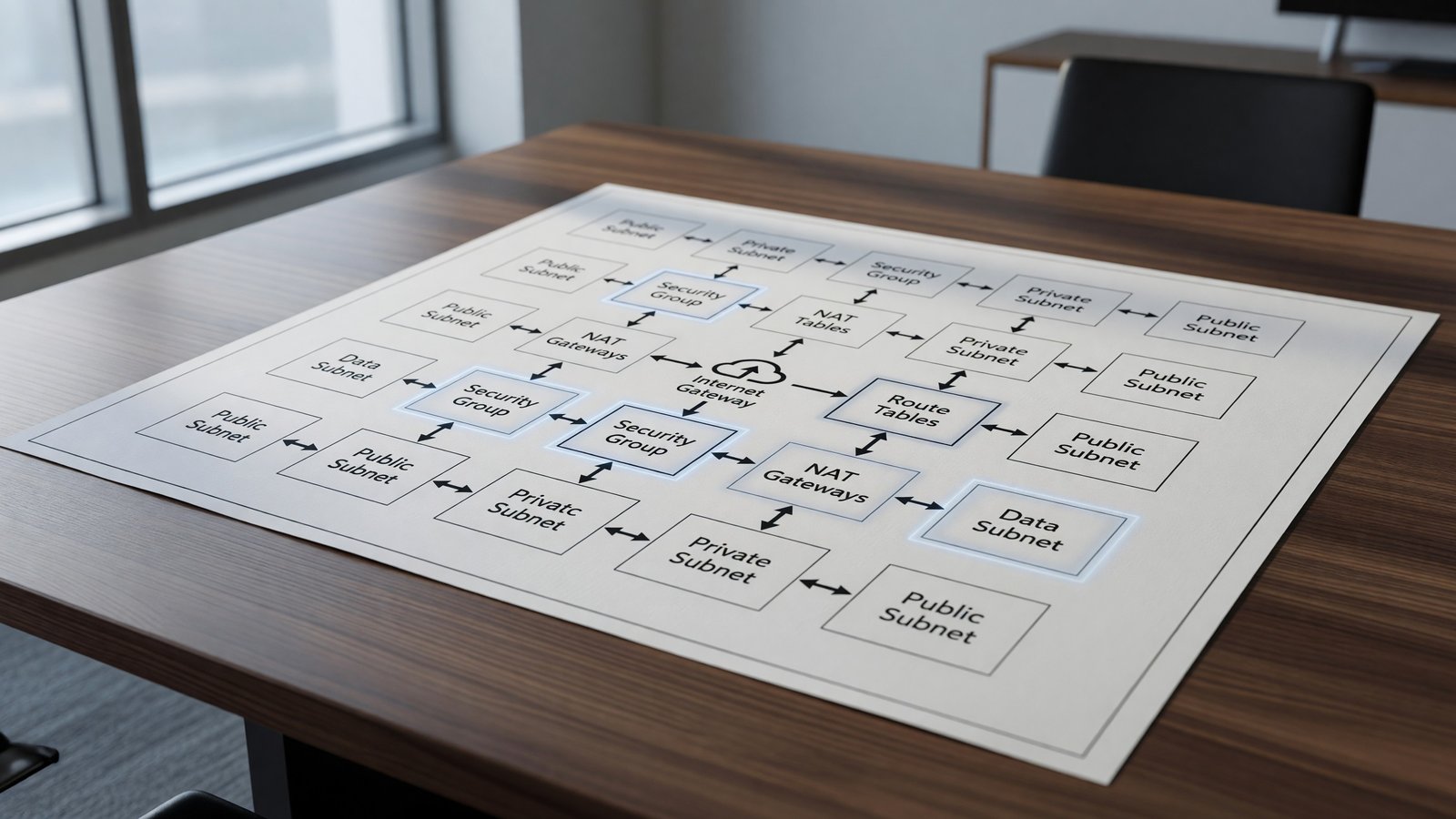
A subnet is a slice of the VPC CIDR range bound to a single availability zone. The subnet’s route table determines what destinations its instances can reach. Public vs private isn’t a property of the subnet itself — it’s whether the subnet’s route table has a default route to an internet gateway.
Standard pattern: three private subnets (one per AZ), three public subnets (one per AZ), and three database subnets (one per AZ) if you’re running RDS or similar. Public subnets contain only load balancers and NAT gateways; everything else lives in private subnets. The AWS VPC documentation covers subnets, route tables, and gateways in detail.
CIDR Planning
Pick a CIDR range large enough to grow into. /16 (65k addresses) is the standard VPC size and rarely causes problems. /20 (4k addresses) feels tight quickly, especially with EKS which assigns IP addresses to every pod.
Plan for non-overlap with other VPCs and on-premises networks. The default 10.0.0.0/16 collides with everyone else’s default 10.0.0.0/16. Use 10.x.0.0/16 or 172.16.0.0/16 with deliberate ranges.
Routing and NAT
NAT gateways let private subnets reach the internet for outbound traffic. They’re managed, scale automatically, and cost roughly $32/month plus data processing charges per AZ. That cost adds up faster than most teams expect.
VPC endpoints (S3, DynamoDB, and the dozens of interface endpoints for other services) bypass NAT entirely for AWS service traffic. They’re cheap or free for gateway endpoints and pay for themselves quickly even for interface endpoints once data volumes climb.
Security Groups vs NACLs
Security groups are stateful instance-level firewalls. Allow rules only — no explicit deny. They’re the right place for nearly all access control: ‘web servers can talk to app servers on port 8080’.
Network ACLs are stateless subnet-level firewalls. Allow and deny rules. They’re a blunter instrument and are usually best left at default-permit. The exception is a hard isolation requirement (compliance boundary, blast radius cap) where a NACL deny gives a second layer of defense.
Multi-VPC and Transit
One VPC per environment per region is the most common structure. Multi-VPC starts to make sense for blast radius reduction, organizational boundaries, or scale (CIDR space, route table entry limits).
Connecting VPCs: peering for simple two-way connections, Transit Gateway for hub-and-spoke at scale, PrivateLink for service-to-service exposure without full network reachability.
Related Reading
- See our deeper guide at /cloud/aws-iam-roles-policies-guide/.
Service Endpoints and Cost Avoidance
NAT gateway data processing charges are one of the most surprising line items on AWS bills. Every byte going through NAT costs ($0.045 per GB at typical pricing). At terabyte scale, this adds up fast.
VPC endpoints bypass NAT for AWS service traffic. S3 and DynamoDB gateway endpoints are free and route bucket and table traffic through the VPC’s route table instead of the NAT gateway. Interface endpoints (for most other AWS services) cost a flat hourly rate plus data processing but are still typically cheaper than NAT at significant volumes.
DNS and Route 53 Resolver
VPC DNS is provided by the Amazon-provided DNS server at the .2 address of the VPC. It resolves public DNS and VPC-internal records (EC2 hostnames, RDS endpoints).
For hybrid setups (VPC + on-premises), Route 53 Resolver endpoints forward DNS queries between environments. Inbound endpoints let on-prem resolve VPC private DNS; outbound endpoints let VPC resources resolve on-prem DNS. The setup is fiddly but the alternative — running DNS proxies in EC2 — is worse.
IPv6 Adoption
IPv4 address space in AWS is no longer free; AWS charges per public IPv4 address since early 2024. For new architectures, IPv6 is increasingly the right choice.
Dual-stack VPCs run both IPv4 and IPv6. IPv6-only subnets save the per-address charges but require all dependencies (services consumed and serving) to support IPv6. The compatibility story is still gradual; pure IPv6 isn’t yet the default.
For workloads that have a lot of outbound traffic and don’t need IPv4 specifically, evaluating IPv6 is increasingly justified by cost alone.
Multi-VPC Architectures
The ‘one VPC’ model breaks down at organizational scale. Common breakdown points: VPC CIDR running out, route table entry limits, regulatory boundaries requiring isolation, multiple AWS accounts (which need their own VPCs).
Transit Gateway is the AWS-native answer for connecting many VPCs and on-premises networks. It supports thousands of VPC attachments, BGP-based routing, and inter-region peering.
PrivateLink is the alternative for service-to-service connectivity without full network reachability. A service in one VPC exposes specific endpoints to other VPCs without routing between them. Better for security-isolated multi-tenant scenarios.
Hybrid and Multi-Cloud Considerations
Few large organizations are purely single-cloud. Acquisitions, regulatory requirements, and specific service preferences all push toward multi-cloud reality. The challenge is operating consistently across the resulting environment.
Tools that help: Crossplane for multi-cloud infrastructure provisioning, Terraform for multi-provider IaC, Kubernetes as a consistent application platform across clouds. Each abstracts away some cloud-specific details at the cost of giving up some cloud-specific capabilities.
The pragmatic path is usually ‘primary cloud plus secondary’ — most workloads on one cloud with specific workloads or backup capacity on another. Pure multi-cloud parity is rarely worth the operational cost.
Tagging and Resource Governance
At any meaningful scale, cloud resource governance requires consistent tagging. Tags by team, environment, project, cost center, and compliance category enable cost attribution, security scoping, and operational filtering.
Enforcement is the hard part. IAM policies can deny resource creation without required tags. Cloud Custodian and similar policy engines can scan for non-compliant resources and remediate.
Without enforcement, tags drift. Engineers create resources for quick experiments and forget to tag. Within a quarter, untagged resources outnumber tagged ones. Build the enforcement early; retrofit is painful.
Documentation and Knowledge Management
Cloud infrastructure changes constantly. Documentation that captures architecture decisions, runbooks for common operations, and explanations of non-obvious choices preserves institutional knowledge through team turnover.
Architecture Decision Records (ADRs) are a lightweight pattern: a short document per significant decision capturing context, options considered, decision, and consequences. ADRs accumulate into a chronicle of why the architecture looks the way it does.
Living documentation beats one-time writeups. Tie documentation to code where possible — README files in repos, comments in Terraform, generated diagrams from infrastructure tools. Documentation that lives near the code it documents stays current.
Compliance and Audit Considerations
Cloud workloads often fall under compliance frameworks: SOC 2, ISO 27001, HIPAA, PCI DSS, FedRAMP. Each has specific control requirements affecting how you architect, configure, and operate.
Common cross-framework requirements: encryption at rest and in transit, access logging and review, incident response procedures, change management, vulnerability management. Building these in from the start is dramatically cheaper than retrofitting under audit pressure.
Tools that help: AWS Config and Audit Manager, GCP Security Command Center, Azure Policy. Each provides continuous compliance monitoring against defined rules. The configuration is upfront work; ongoing compliance becomes monitoring rather than periodic discovery.
Looking Ahead
Cloud infrastructure continues to evolve rapidly. The shifts most relevant to platform teams today: continued moves toward serverless and managed services that reduce operational overhead, growing importance of cost optimization as cloud spend matures into a major budget line, and the increasing role of compliance and data sovereignty in architecture decisions.
Teams that invest in transferable skills — Linux fundamentals, networking, distributed systems, observability — adapt to specific cloud changes more easily than teams that invest narrowly in vendor-specific certifications. The vendor-specific knowledge matters, but it’s a layer on top of broader engineering capability.
The cost of building infrastructure has dropped dramatically in two decades; the cost of operating it well has not. The teams that thrive long-term combine cloud-native tooling with the operational discipline that makes any infrastructure reliable.
Practical takeaway: don’t chase every new cloud service. Identify the gaps in your current architecture, evaluate options carefully against your requirements, and move deliberately. The pace of cloud announcements far exceeds the pace at which most organizations should adopt new technologies.
Frequently Asked Questions
How big should my VPC CIDR be?
/16 unless you have a specific reason to go smaller. Address space is free; running out is painful.
Do I need a NAT gateway in every AZ?
For high availability, yes. For cost-sensitive environments, a single NAT in one AZ saves money but creates cross-AZ data charges and a failure domain.
Should I use security groups or NACLs?
Security groups for almost everything. NACLs as a coarse second layer for hard isolation requirements.
How do I plan for cross-account VPC connectivity?
Transit Gateway if you have many VPCs. VPC peering for occasional point-to-point. Resource Access Manager (RAM) shares subnets across accounts without peering at all.